
Introduction
Sometimes it is necessary to trash an item, that is effectively hide it from the front end. What happens is that the item is relocated to the 'trashed items'. Later if you try to create an item of the same type and same name, then when you try save it then you will get a message such as 'item of same alias already exists'.
So there becomes a need to be able to find the trashed item and either 'restore' it or permantly remove it from the trashed items.
This article illustates how to do this with Joomla Tags which are often used in jDownloads Categories and Downloads as another way to group items. It would also apply to Joomla Articles. It does not happen in jDownloads Categories and Downloads as 'trashing' is not used, that is delete has no way back.
So there becomes a need to be able to find the trashed item and either 'restore' it or permantly remove it from the trashed items.
This article illustates how to do this with Joomla Tags which are often used in jDownloads Categories and Downloads as another way to group items. It would also apply to Joomla Articles. It does not happen in jDownloads Categories and Downloads as 'trashing' is not used, that is delete has no way back.
Trash Tags
To show the tags then goto the  then click on
  and then on
  .
.
Suppose we have created the four tags as illustrated opposite and have decided to 'delete', that is to trash Tag1A. So select Tag1A as shown on the second image opposite.
When an item has been selected you will notice that the tab is now active.

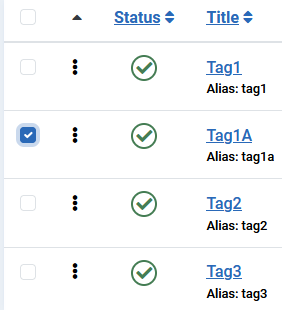
then click on and then on .Suppose we have created the four tags as illustrated opposite and have decided to 'delete', that is to trash Tag1A. So select Tag1A as shown on the second image opposite.
When an item has been selected you will notice that the
tab is now active.So use the pulldown and click on  as indicated.
This will give a message .
.
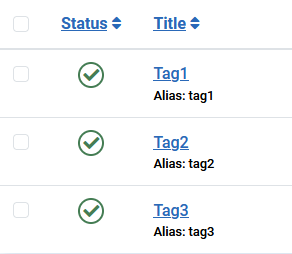
The tag list will now look like the image on the far right.
Actually the Tag1A is still available. This is to cover the situation when we have trashed an item by mistake.
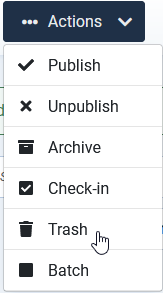
as indicated.This will give a message
.The tag list will now look like the image on the far right.
Actually the Tag1A is still available. This is to cover the situation when we have trashed an item by mistake.
Restoring a trashed item
Click on item type such as , which is in , or if dealing with an article, click on which is in
  . Next at top, click on
 then click on
  pulldown. Next click on Trashed as indicated opposite.
This lists all the Trashed Tag items which in this simple example is just Tag1A as shown below.
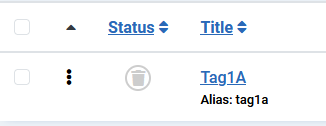
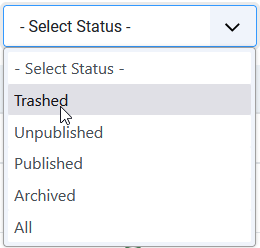
, which is in , or if dealing with an article, click on which is in . Next at top, click on then click on pulldown. Next click on Trashed as indicated opposite. This lists all the Trashed Tag items which in this simple example is just Tag1A as shown below.
To restore select the trashed item as illustrated below.
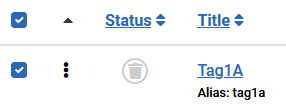
Select the pulldown and click on Publish as indicated in the first image on the right.
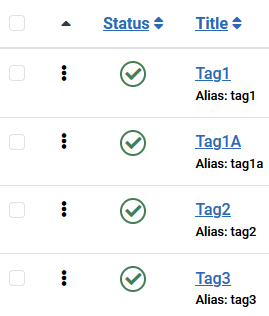
The previously trashed item is now restored as shown on the image on the far right.
Although not shown here, the restored item also retains its original ID value.

Select the
pulldown and click on Publish as indicated in the first image on the right.The previously trashed item is now restored as shown on the image on the far right.
Although not shown here, the restored item also retains its original ID value.
Permantly deleting trashed item
Click in
 . Next Click on and then click on Trashed as indicated opposite. This brings up a list of the trashed items. They have a Status with the trash symbol
  . So 'select' by ticking the one that is to be deleted, in this example Tag1A.
Click on Yes to continue with the deletion Next click on the
 button.
A warning message such as shown opposite wiil appear. Click on the
 to complete the deletion permanently.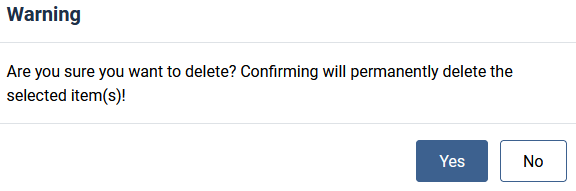
If you delete all of the tags then an image such as the one opposite is shown.
ColinM January 2025, May 2025, January 2026, May 2026


