
Introduction
Upgrading from Joomla4 to Joomla5 is said to be an update. This is true if all the existing extensions (Components, Mouldules and Plugins) are compliant! By using the Joomla Next update method then these extensions will be checked. It will also check that your PHP level and Database version meet the minimum standards.
The images opposite show the principal requirements for J4, J5 and J6. The main change in these is that the minimum PHP level for J5 is now 8.1 and for J6 it is 8.3.


Getting to Joomla Next
On the  page click on the
 button. Then in the
 section, click on
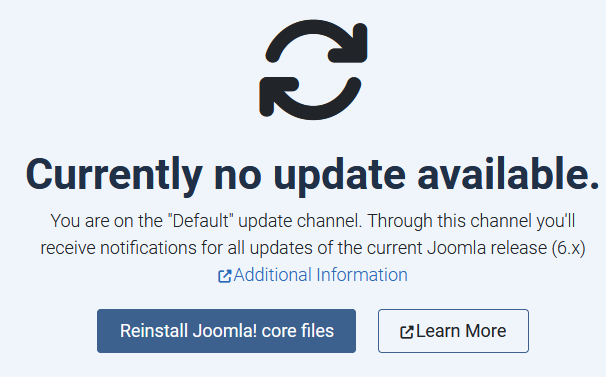
 . This may show that there is no update availabe as shown in the the image opposite.
Next at top right Click on the button. This shows the Update Source so use the pull down as indicated opposite to select option Joomla Next.
So again click on the button and then in the Section. 
page click on the button. Then in the section, click on . This may show that there is no update availabe as shown in the the image opposite.Next at top right Click on the
button. This shows the Update Source so use the pull down as indicated opposite to select option Joomla Next.So again click on the
button and then in the Section. If there is no update available then exit by clicking on the
 button at the top right.
Compatibility Check
If an update is available
this instigates the 'checking' process.
It typically brings up the view as shown opposite. Note that the reqirements for Joomla 4, 5 and 6 are similar.
So click on the
 as indicated opposite.

This presents the detailed report as shown opposite which is querring the jDownloads System Plugin.
Actually the jD System Plugin is OK.
Apparently it is the way the system plugin is coded so it apparently does not totally conform to Joomla practice.
If you scroll further down you will see a report as shown below. If you now scroll down to the bottom of the report you will find
 This then gives an 'Are you Sure Message' where you need to click on OK. The
 button is now active so click on it.

Actually the jD System Plugin is OK.
Apparently it is the way the system plugin is coded so it apparently does not totally conform to Joomla practice.
If you scroll further down you will see a report as shown below.
If you now scroll down to the bottom of the report you will findThis then gives an 'Are you Sure Message' where you need to click on OK. The button is now active so click on it.Updating
Click on the "i'm aware..." message and then on the  .as indicated opposite.
This will start the Update. After a little time it becomes


.as indicated opposite.This will start the Update.
After a little time it becomesYour site has now been upgraded to Joomla 5.
Note that the update channel has been reset to "Default" so when the next update to Joomla becomes available it will be notified in the normal way.
That is click on the button then in the section click on .

Note that the update channel has been reset to "Default" so when the next update to Joomla becomes available it will be notified in the normal way.
That is click on the
button then in thesection click on .Colin M rewritten Febuary 2025 updated June 2026, July 2026
